Purchase 4: displaying payment instructions
When performing a purchase, the customer follows the payment instructions displayed in your system.
| Countries and regions | Cameroon, Madagascar, Tanzania, Zambia |
| Payment currencies | MGA, TZS, XAF, ZMW |
| Payment amount limits | Contact your key account manager at SilverCods for details. Also you can check the payment amount limits in your project by using Dashboard. |
| Payment processing time | Contact your key account manager at SilverCods for details. |
| Currency conversion | On the SilverCods side |
| Refund |  |
| Onboarding and access fee | Contact your key account manager at SilverCods for details. |
| Special considerations The amounts for the XAF currency must be specified in major currency units (without any fractional part) according to the ISO-4217 alpha-3 standard. For example, if the customer initiates a 1000 XAF purchase in your system, you are required to submit the You can check the number of digits for minor currency units for any currency in Currency codes. | |
Operations support
| Interfaces | |||
|---|---|---|---|
| Payment Page | Gate | Dashboard | |
| Purchase |  |
|
|
You can check the payment amount limits in your project by using Dashboard. To check your payment amount limits, go to Dashboard, select the Projects section, and then click the Payment methods tab.
The following sections provide more information about the payment processing flow and the analysis of completed payments.
Supported mobile network operators
The table below lists the mobile network operators available for performing purchase with the Mobile Commerce in Africa (Redirect) payment method.
| Mobile network operator | ID | Countries | Currencies |
|---|---|---|---|
| Airtel | AIRTEL |
Madagascar, Tanzania, Zambia | MGA, TZS, ZMW |
| Halopesa | HALOPESA |
Tanzania | TZS |
| MTN | MTN |
Cameroon, Zambia | XAF, ZMW |
| MVola | MVOLA |
Madagascar | MGA |
| Orange | ORANGE |
Cameroon, Madagascar | MGA, XAF |
| Vodacom | VODACOM |
Tanzania | TZS |
| Yas (Tigo) | TIGO, YAS |
Tanzania | TZS |
| Zamtel | ZAMTEL |
Zambia | ZMW |
Note that the list of mobile network operators in the table is provided for informational purposes only. To get the current list of available mobile network operators, contact your key account manager at SilverCods.
Purchase by using Payment Page
General information
To perform a purchase by using Payment Page with the Mobile Commerce in Africa (Redirect) payment method:
- Send a request with all the required parameters and signature to the SilverCods URL.
- Accept the callback with the purchase result from the payment platform.
The following figure shows the complete purchase processing flow in the Mobile Commerce in Africa (Redirect) payment method.
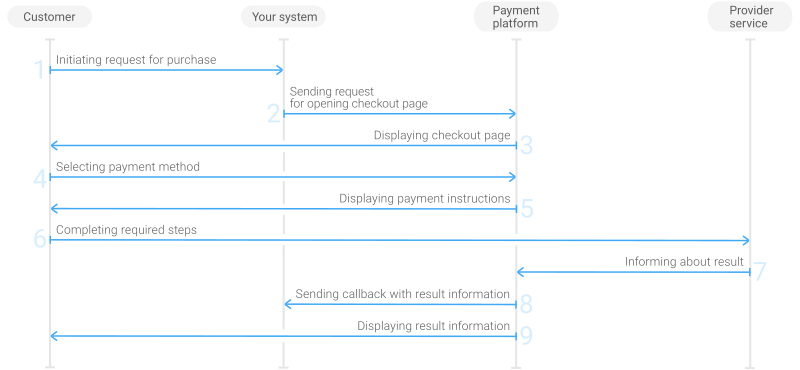
- The customer initiates a purchase in your system.
- Your system sends the request for the purchase through Payment Page to the SilverCods URL.
- The checkout page is displayed to the customer.
- The customer chooses to make a purchase with the Mobile Commerce in Africa (Redirect) payment method.
- The checkout page displays the payment instructions to the customer.
- The customer completes the purchase.
- The provider service sends the purchase result information to the payment platform.
- The payment platform sends a callback with the payment result to your system.
- The payment platform displays the payment result to the customer on the checkout page.
Request
The following table lists the parameters that you have to include in the request for purchase through the checkout page with the Mobile Commerce in Africa (Redirect) payment method.
|
||
|---|---|---|
| Parameter | Description | |
project_id | Project ID you obtained from SilverCods when integrating. Example: | |
payment_id | Payment ID unique within your project. Example: | |
customer_id | Unique ID of the customer within your project. Example: | |
customer_first_name | Customer's first name. Example: | |
customer_last_name | Customer's last name. Example: | |
customer_email | Customer's email. Example: | |
payment_currency | Code of the payment currency in the ISO-4217 alpha-3 format.
Example: | |
payment_amount | Payment amount in major currency units (without fractional part). If the currency has minor units (i.e. the number of digits for minor currency units is not zero), set this parameter to the amount in the minor currency units without any decimal point or comma. To check whether the currency has any minor units, see Currency units and Currency codes. Example: 100 XAF must be sent as | |
force_payment_method | Parameter that allows you to enforce the Mobile Commerce in Africa (Redirect) payment method for your customer and skip the page with payment method selections. To enforce the Mobile Commerce in Africa (Redirect) payment method and skip the page with payment method selection, add the force_payment_method parameter to the request and set its value to Example: | |
signature | Signature created after you've specified all the request parameters. For more information about signature generation, see Signature generation and verification. | |
| You can also add any other optional parameters to the request, if necessary. For the list of all the parameters possible in requests to Payment Page, see Payment Page invocation parameters. | ||
Here is an example of the data from a request to open the checkout page by using
EPayWidget:
EPayWidget.run(
	{
		project_id: 1234,
		payment_id: 'payment_47',
		customer_id: 'customer_123',
		customer_first_name: 'John',
		customer_last_name: 'Doe',
		customer_email: 'johndoe@example.com',
		payment_currency: 'XAF',
		payment_amount: 100,
		force_payment_method: 'mobile',
		signature: 'kUi2x9dKHAVNU0FYldJrxh4yo+52Kt8KU+Y19vySO/RLUkDJrOcZzUCwX6R/ekpZhkIQg=='
	}
)
Callback
In the Mobile Commerce in Africa (Redirect) payment method, the payment platform returns the purchase result in a callback. For the information about the callback structure, see Callbacks in Payment Page.
In this payment method, callbacks also have the account object with the number, customer_name, and type parameters containing information about the customer's phone number, their full name, and their mobile network operator. Customer name might not be present in the callback, contact your key account manager at SilverCods for details.
The following is an example of a callback body with information about a successfully completed purchase.
{
    "project_id": 1234,
    "payment": {
        "id": "payment_47",
        "type": "purchase",
        "status": "success",
        "date": "2024-12-07T19:08:45+0000",
        "method": "mobile",
        "sum": {
            "amount": 100,
            "currency": "XAF"
        },
        "description": ""
    },
    "customer": {
        "id": "customer_123"
    },
    "operation": {
        "id": 47,
        "type": "sale",
        "status": "success",
        "date": "2024-12-07T19:08:45+0000",
        "created_date": "2024-12-07T19:08:05+0000",
        "request_id": "1a23456bc7890de",
        "sum_initial": {
            "amount": 100,
            "currency": "XAF"
        },
        "sum_converted": {
            "amount": 100,
            "currency": "XAF"
        },
        "code": "0",
        "message": "Success",
        "provider": {
            "id": 12345,
            "payment_id": "123abc123-123",
            "auth_code": ""
        }
    },
    "account": {
        "number": "233123456789",
        "type": "ORANGE",
        "customer_name": "John Doe"
    },
    "signature": "U7HQO7ToISZhMPKdM4XrUKQtoYzFvoB3cs9CRd4xeYG2Q=="
}
The following is an example of a callback for a declined purchase.
{
    "project_id": 1234,
    "payment": {
        "id": "payment_47",
        "type": "purchase",
        "status": "decline",
        "date": "2024-12-07T19:08:45+0000",
        "method": "mobile",
        "sum": {
            "amount": 100,
            "currency": "XAF"
        },
        "description": ""
    },
    "customer": {
        "id": "customer_123"
    },
    "operation": {
        "id": 47,
        "type": "sale",
        "status": "decline",
        "date": "2024-12-07T19:08:45+0000",
        "created_date": "2024-12-07T19:08:05+0000",
        "request_id": "1a23456bc7890de",
        "sum_initial": {
            "amount": 100,
            "currency": "XAF"
        },
        "sum_converted": {
            "amount": 100,
            "currency": "XAF"
        },
        "code": "20000",
        "message": "General decline",
        "provider": {
            "id": 12345,
            "payment_id": "123abc123-123",
            "auth_code": ""
        }
    },
    "account": {
        "number": "233123456789",
        "type": "ORANGE",
        "customer_name": "John Doe"
    },
    "signature": "U7HQO7ToISZhMPKdM4XrUKQtoYzFvoB3cs9CRd4xeYG2Q=="
}